Left Arrow
Back to Projects

Cygnus

Build automation your way using prompts, workflows, or code, all within one system designed for every level of expertise.
CONTEXT
Internal product at Target (Automation Platform)
STATUS
Live and being used by over 95 teams
MY ROLE
End-to-End Design including User Research, UI Design, Prototyping and User Testing
Build automation your way

Different Users. Different Ways to Build

Not everyone building automation is technical, but most tools are designed as if they are.
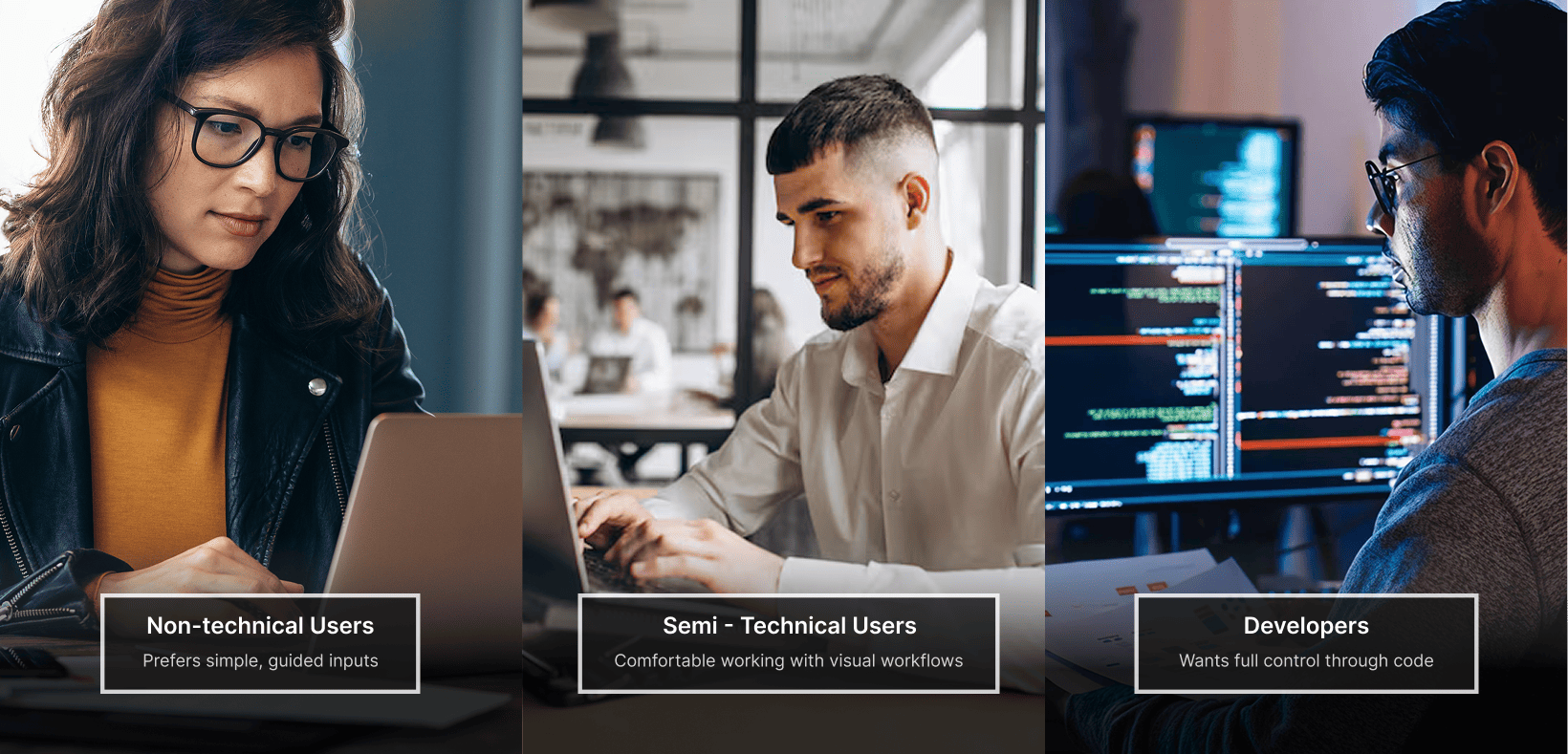
👉 Most automation tools are built for one type of user, forcing everyone else to adapt or fall behind

Core Problem

There isn’t a single system that works across all skill levels. Users are forced to adapt, compromise, or start over.

Quick Demo of Cygnus

What we heard?

Through conversations with 12+ users across engineering, ops, and analytics teams, three patterns emerged consistently.
“I don't know how to write a workflow, I just know what I want it to do."
Non-technical user
“I always end up redoing it in code anyway because I don't trust what the tool generated.”
Developer
“I need to see what's happening under the hood before I run anything in production.”
Semi-technical User

Rethinking how an Automation is Built

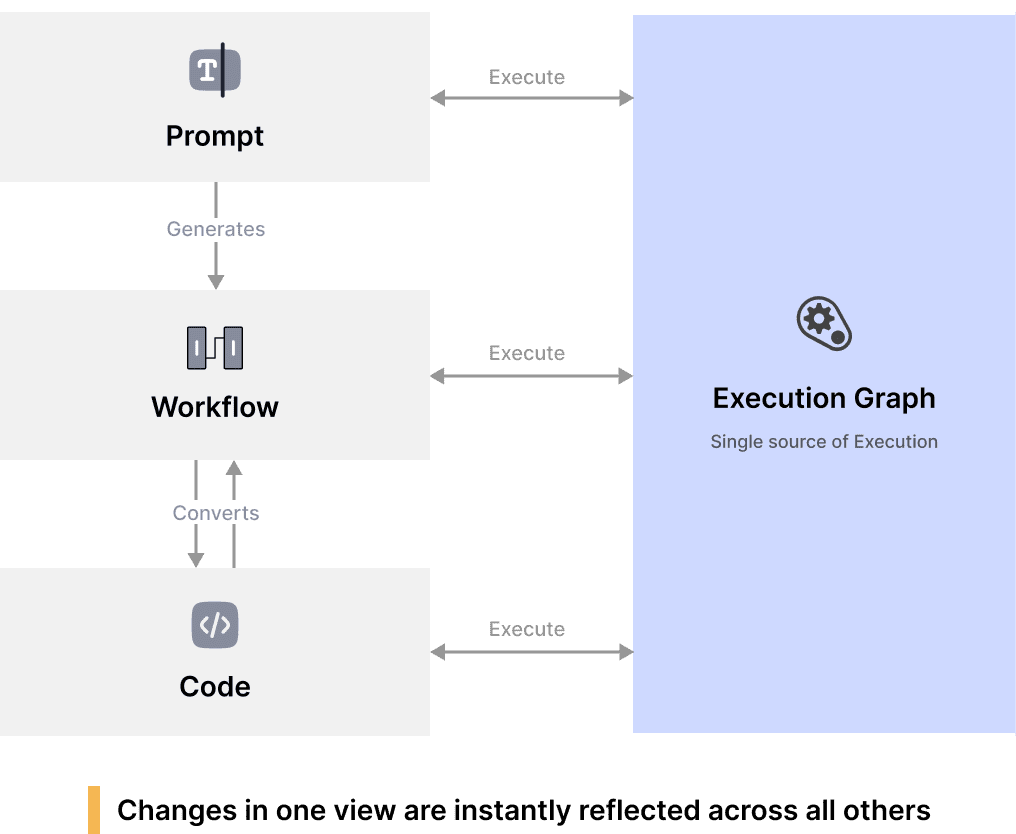
Prompts, workflows, and code aren't separate tools, but different ways to express the same automation.
The problem wasn't technical skill. It was fragmentation. Instead of designing three separate experiences for three types of users, I unified them into a single system with one execution layer.

And since not all automation starts with clear intent, the system also lets users record their own actions and convert them directly into workflows.

Turning the system into a usable experience

Now that the system supports multiple ways of building automation, the challenge was to bring it together into a single, intuitive workspace.
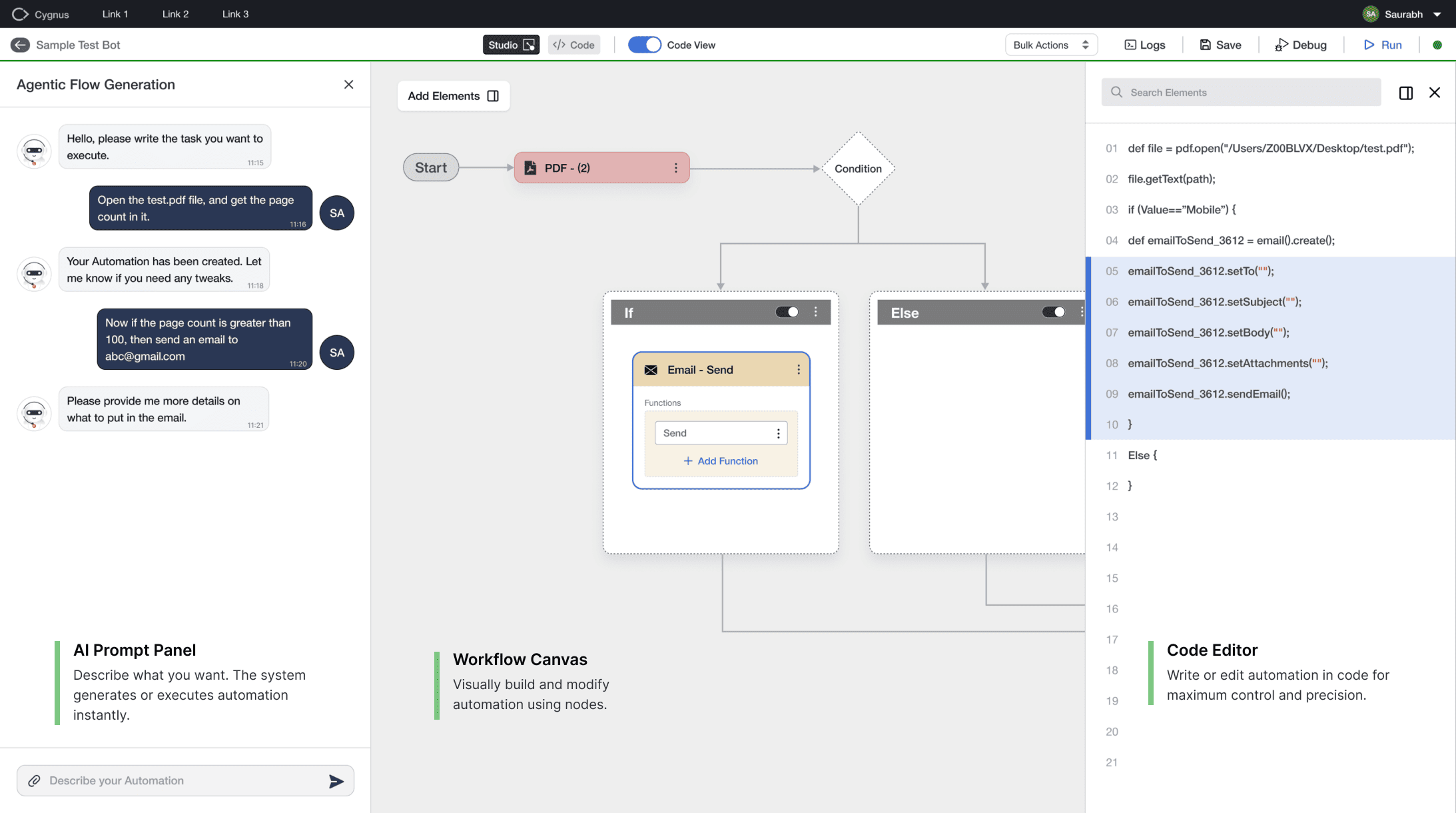
👉 Users can start anywhere — prompt, workflow, or code — and move between them seamlessly within one workspace.

Multiple Ways to Build Automation

Users can start from different entry points depending on their technical comfort and workflow needs.

Prompt  --->  Execute
Start with a prompt and run instantly
Prompt  --->  Workflow  --->  Execute
Generate and refine before execution
Workflow  <----> Code  --->  Execute
Build and customize with full control
Record  --->  Workflow  --->  Execute
Capture actions and convert into automation

Key Design Decisions

Designing a flexible automation system required balancing simplicity, control, and clarity. These decisions shaped how the system behaves in practice.

Avoiding separate modes
I kept AI, workflows, and code in one workspace instead of splitting them into modes.
Tradeoff: Harder to design, but removes context switching for users.
Balancing AI with user control
AI could have handled everything, but I exposed workflows and code for visibility and edits.
Tradeoff: Slightly more complexity, but much higher trust.
Supporting unclear user intent   
Users don’t always know what to automate, so the system supports prompts and action recording.
Tradeoff: More entry points, but better accessibility.      
Maintaining system consistency
All interactions map to a single execution layer to keep everything in sync.                                      
Tradeoff: More complex system design, but seamless user experience.

How it evolved?

Shipping was the starting point, not the finish line. As teams adopted Cygnus, real usage surfaced patterns we hadn't fully anticipated. Here are two decisions we revisited after launch.
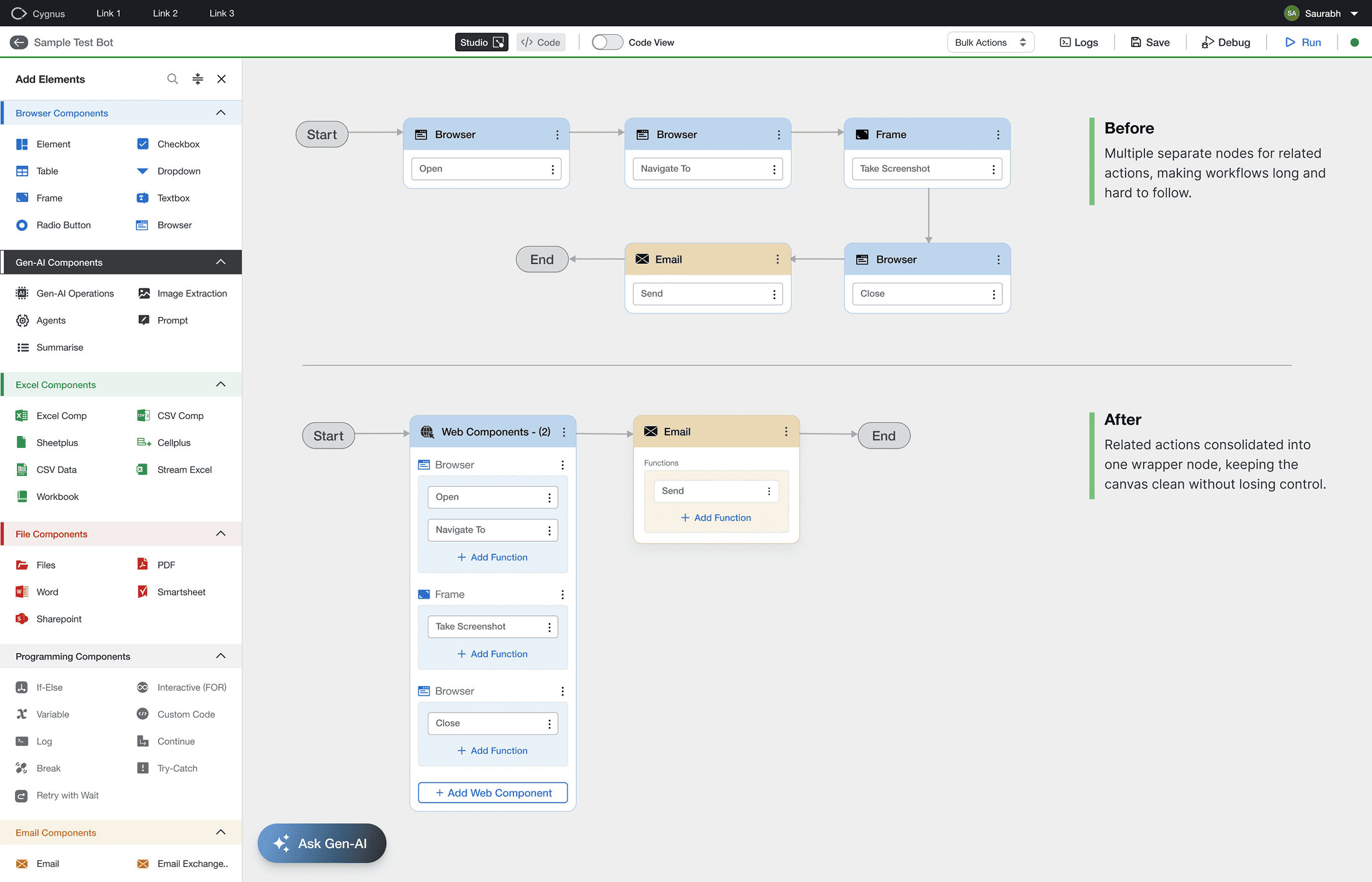
Simplifying the Workflow Canvas
Users building complex automations were placing multiple separate nodes for related actions like open, navigate, and screenshot, making workflows hard to read and debug. We introduced wrapper nodes that group related actions into a single container, keeping the canvas clean without removing granular control.
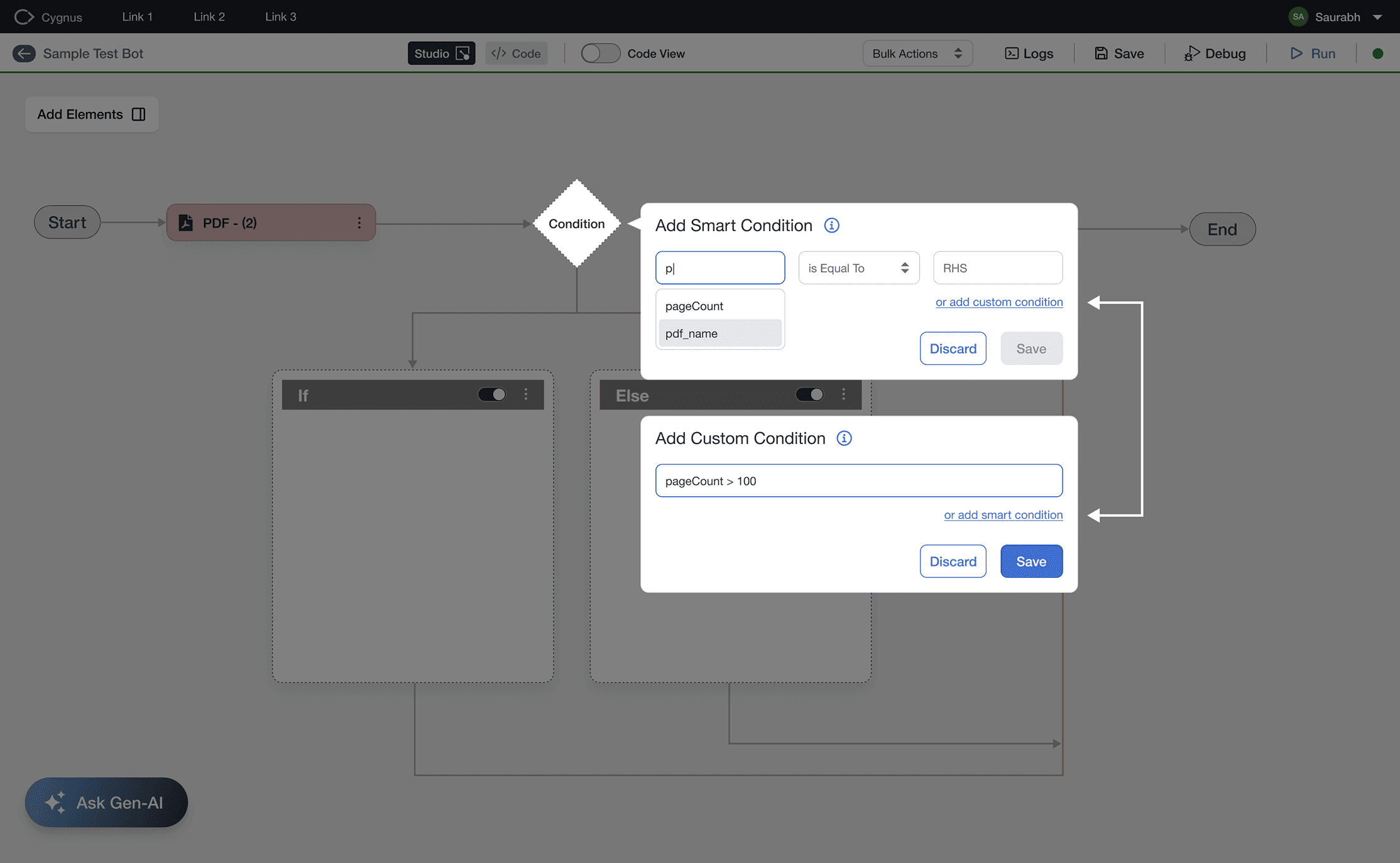
Conditions for Every Skill Level
Conditions like "pageCount > 100" suit developers but confuse non-technical users. We created a dual-mode builder: Smart Condition uses guided dropdowns for users who know their needs but not syntax, while Custom Condition offers developers free-form input. Both share one interface with easy switching.

Our Impact

  • Scaled to 95+ teams across Target, growing from a single-team pilot to one of the most widely adopted internal automation platforms.
  • Reduced automation creation time by 80% and enabled non-technical users to independently build workflows — previously a developer-only task.
  • Reduced bottlenecks across teams by broadening who could contribute to automation workflows.
Build automation your way